Short answer: HRCI doesn’t care whether you watched live or on demand. It cares whether the activity is pre-approved (or otherwise qualifies) and whether you can prove you completed it. The catch is that each provider’s approval covers specific programs and formats, so a recording may or may not carry the same credit as the live session. Compare providers on that first, then on how they prove attendance, what their certificate shows, how you ask questions and what each credit really costs.
How HRCI sees live and recorded webinars
HRCI’s system is built around the activity, not the format. When a provider has a program pre-approved, it gets an Activity ID (HRCI also calls it a program code). You enter that ID in your HRCI account, and HRCI accepts the credit without further review. One HRCI credit equals one hour of learning, rounded to the nearest quarter hour, and only educational time counts.
So the question isn’t "does HRCI accept recordings?" It’s "did this provider get the recorded version approved, and will my certificate show it?" Some providers award HRCI credit only to people who attend live. Others extend it to the recording. You find out by asking, not by guessing.
If a recording isn’t pre-approved, you may still be able to report it yourself as continuing education, linked to HRCI’s Exam Content Outline. That route takes more paperwork and holds up less well if you’re audited.
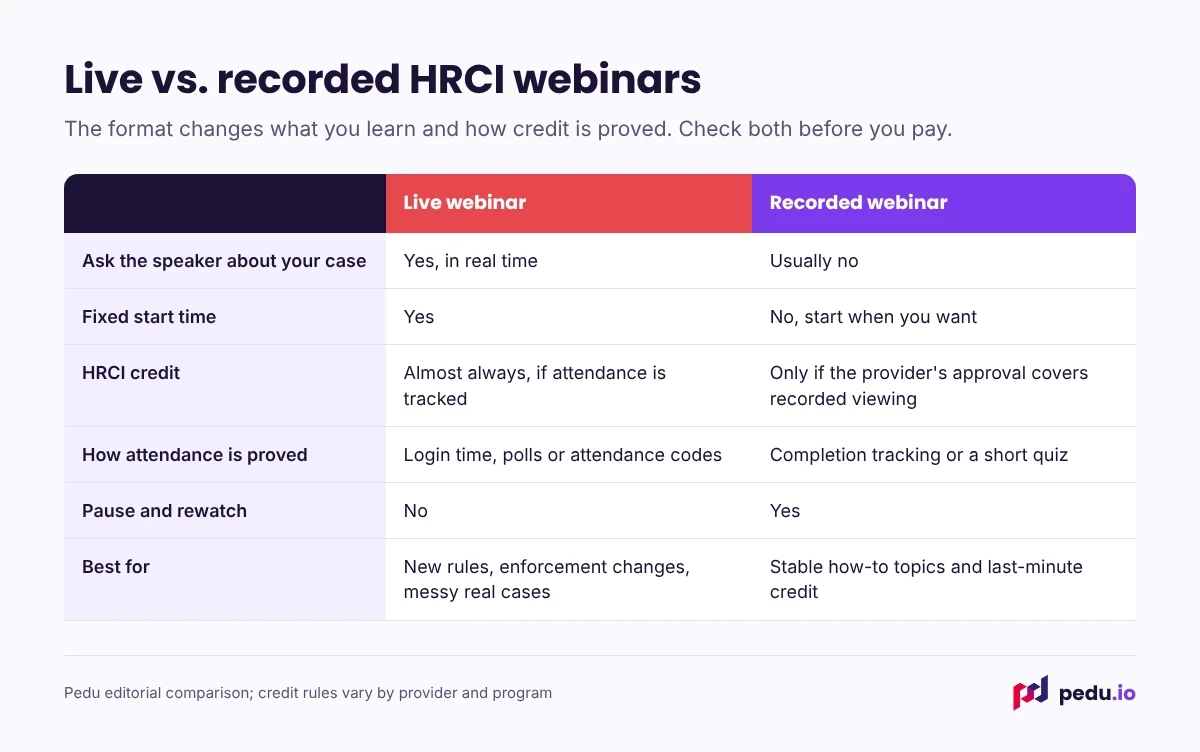
How providers prove you attended
This matters more than most people realize, because HRCI randomly audits recertification applications. If yours is picked, you’ll need documents that show the activity, its date and time, and that you completed it.
Live sessions usually rely on the webinar platform’s attendance log: how long you were connected. Some add polls or an attendance code read out during the session.
Recorded sessions usually track completion in the player, require you to reach the end, or add a short quiz.
Either is fine. What’s not fine is a provider that issues certificates to anyone who registered, whether or not they watched. That certificate may not survive an audit.
Six questions to compare HRCI webinar providers
Ask these before you buy, especially if you’ll rely on recordings.
- Does the recording carry HRCI credit, and under which Activity ID? Get the answer in writing or see it on the session page.
- What credit type is it? General, Business, Global or California. If you hold SPHR, SPHRi, GPHR or PHRca, the type matters as much as the number.
- How do you confirm completion? Attendance log, player tracking or quiz.
- What does the certificate show? You want your name, the program title, the date you completed it, the credit hours and the Activity ID.
- Which date goes on a recorded-session certificate? It should be the date you finished, and it has to fall inside your cycle.
- What does each credit cost? Divide the price by the credit hours, and compare plans the same way.
A comparison worksheet
Ask every provider the same eight questions and note the answers side by side. Here’s how Pedu answers them, so you can see what a complete answer looks like:
- Does the recording earn HRCI credit? Yes, the same credit as live.
- Which credit types? HR (General); Business on selected sessions.
- When is the recording available? In your account within 24 hours.
- Does the certificate show the Activity ID? Yes.
- Is there live Q&A? Yes, on GoTo Webinar.
- Is there a transcript? Yes, downloadable.
- Price per session? $199, for sessions of 60 to 120 minutes.
- Plans? 5-pack $599, 10-pack $799, unlimited $999 a year.
When to choose live, and when recorded
Choose live when the topic is new or contested, you have a situation you need to ask about, or you learn better with a fixed time on the calendar.
Choose recorded when the topic is stable and procedural, you’re closing a credit gap against a deadline, or your schedule makes fixed times impossible.
Most HR professionals end up with a mix: live sessions for the year’s big changes, recordings to fill in the rest.
Live and recorded at Pedu
Pedu is an HRCI Approved Provider. Every live session is recorded and added to your account within 24 hours, and the recording of a credit-eligible session earns the same HRCI credit as attending live. Your certificate, with the Activity ID, downloads from your account once you’ve completed the session.
See our accreditation details, the HRCI recertification credits guide and the recorded sessions available now.
Frequently asked questions
Does HRCI accept recorded webinars for recertification credit?
Yes, when the recorded program is pre-approved and has an Activity ID, or when it otherwise qualifies under HRCI’s rules. Whether a particular recording is pre-approved depends on the provider, so check the session page or ask before you buy.
Is the Activity ID the same for the live and recorded versions of a webinar?
Not always. Some providers use one Activity ID for both; others register the recording as a separate program. Use whatever Activity ID appears on your certificate, not the one from the live session’s promotion.
What date do I enter for a recorded HRCI webinar?
The date you completed it. That date must fall within your current three-year cycle, which is why a recording you finish the day after your cycle ends won’t count toward that cycle.
Do live HRCI webinars earn more credit than recorded ones?
No. Credit is based on educational time, so a 90-minute session earns 1.5 credits either way. Registration time, breaks and any sales segment don’t count.
Can I skip ahead in a recorded HRCI webinar?
You shouldn’t. Credit is for the full educational time, and many providers track playback or require you to reach the end before they issue a certificate. Skipping can also leave you with a certificate that doesn’t hold up in an audit.
What can I do if a recording I watched isn’t pre-approved?
You may be able to self-report it as continuing education, linked to HRCI’s Exam Content Outline, with your own documentation. It’s more work and less certain than a pre-approved Activity ID, so pre-approved sessions are the better use of your time.
Is live or recorded better for SPHR Business credits?
Whichever one is approved as Business credit. Business-credit sessions are less common than General ones, so filter by credit type first and format second.
What proof of attendance should I keep for HRCI?
Keep the certificate showing your name, the program title, the date, the credit hours and the Activity ID. Upload it to your HRCI account when you log the activity. If you’re audited, HRCI may also ask for registration or payment confirmation.
Are HRCI’s own webcasts live or recorded?
HRCI’s webcasts play from a link, so you watch them when it suits you. HRCI doesn’t send separate proof of attendance, so take a screenshot showing the webcast and its Activity ID before you close it.